# Whatsapp Link :iphone:
Simple node for connecting Node-Red to Whatsapp :iphone:
Currently in developing mode, Continous updated may encounter. :sweat_smile:
Missing Nodes ? : To avoid long names, Node names are updated. If some node are missing after update please re-configure the update node, it will not change again.
## To Connect with Whatsapp
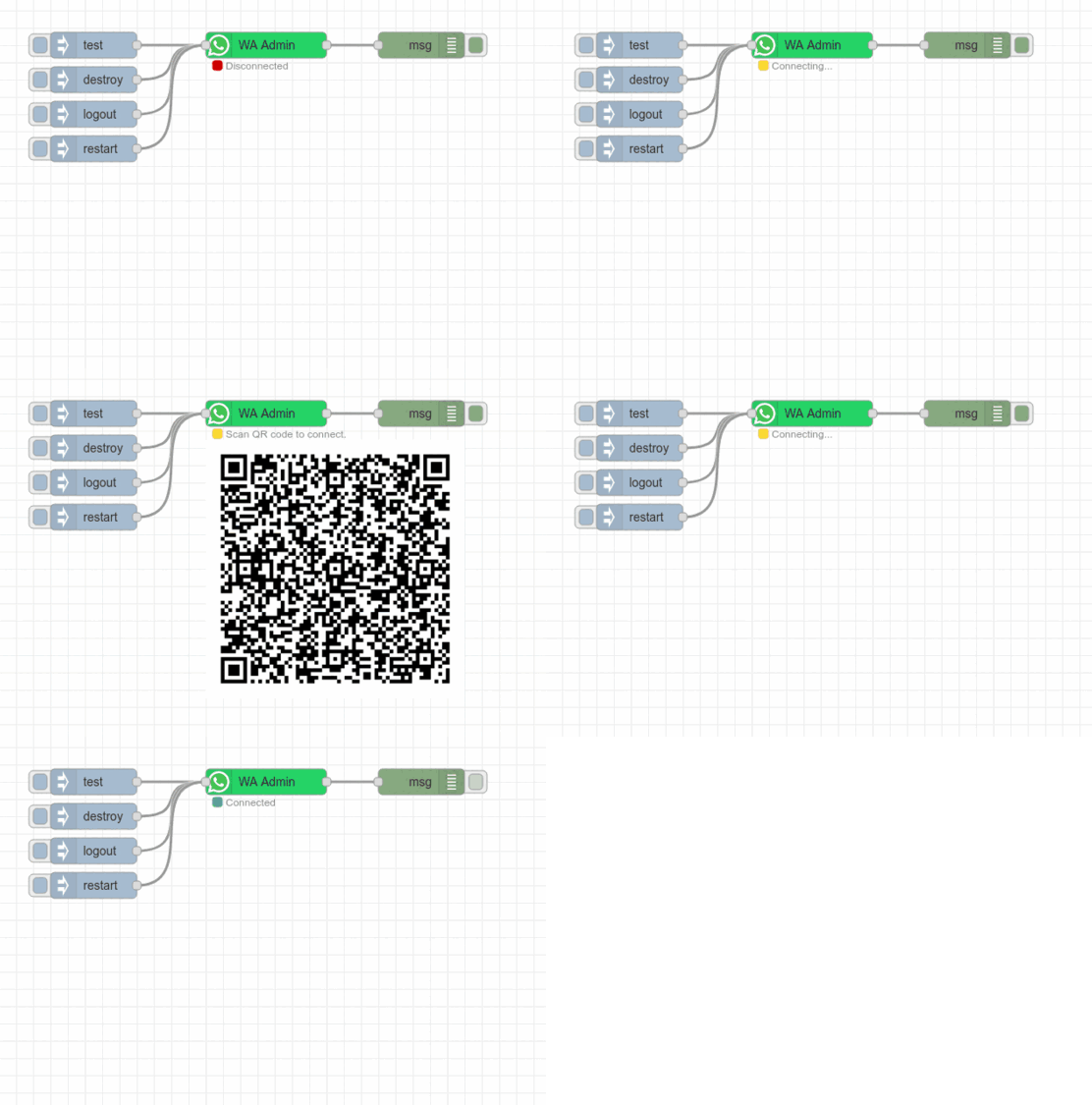
1. Deploy whatsapp admin node (along with whatsappLink node).
2. whatsappLink node will initilize, connect with whatsapp and generate a QR code below the Admin Node (in terminal also).
3. Scan the QR code with your Whatsapp Mobile App (Go to settings > Linked device > Scan & Connect).
4. Done - Whatsapp Connected.
*It will create a Whatsapp Web instance in your machine and store your session locally in Node-RED. All session is store in `.wwebjs_auth` folder*
## Nodes
1. **Whatsapp Admin** : Node used for first time users to connect with whatsapp and other admin related tasks.
Admin Node generate QR Code just below the node for easy connection with whatsapp.
| Inputs | Description |
|--------|-------------- |
| test | Checks the current status of whatsapp and output the same in `msg.payload`|
| destroy| Close the client and destroy the whatsapp connection.|
| restart | Restart the whatsapp connection. |
| logout | Simply log you out and close the session. |
---
| Output | Description |
|--------| ------------|
|`status` | provide status on `msg.payload` for all and each input mentioned in above table. |
| Connecting..| When whatsapp attempting to connect.
| QR Code (image) | when QR code is generated. *This method can also be used to get QR Code (image) generated by whatsapp.*
| Connected | When whatapp is sucessfully connected.|
| Group Joined or Removed | `msg.paylod` : Group Name. `msg.type` : joined / Removed from group. `msg.notification` : Complete notification. `msg.chat` : Complete Group Details.
2. **Chats In** : Node to recive all messages send to connected number.
- Simply deploy the node and wait for green (connected) status.
- After succesfully connection, Node is able to recive all messages.
| Output | Description |
|--------|-------------|
| `msg.paylod` | Recived message |
| `msg.from` | Sender Number |
| `msg.chatID` | Chat ID of Group chat / Personal chat |
| `msg.message` | Complete message object.
*Some extra details for advance users* |
3. **Chats Out** : As simple as mention on name, node will send `msg.payload` recived at input to the number mentioned in node.
*Don't forget to mention international dialing code befor your number. Number must be in format like `+11 99999 99999` without any space.*
4. **Group Message** : Whatsapp Group Node to send message in a Group.
The node will send recived `msg.payload` to a group chat.
## Issues & Updates
Issues and Suggestions are welcome [here.](https://github.com/raweee/node-red-contrib-whatsapp-link/issues)
* `Ver-0.1.21` : Group Message Node added.
* `Ver-0.1.23` : Nodes are formatted correctly and names are updated.
* Working on QR Code to directlly avilable in run time on Whatsapp-Admin-Node.
## Future Nodes
Currently working on more Whatsapp Node and will be avilable soon -
1. Group Message Node (Working).
2. Chat Reply node.
3. Instruction (smart) Reply Node.
Complete detail for Nodes will also be updated as soon as possible.
>Please don`t try to spam with your personal Number, Suspicious activities might be tracked by whatsapp.
Thanks to bear with me